
How Sidekick picks which Shopify apps to recommend
When a merchant asks Sidekick for an app, it turns the request into one to three keywords, runs App Store search, and shows three organic results in the order the App Store returns them. In six of my seven tests, those were the first three.
I tested that on my own development store: four requests on October 14, 2026, then three harder ones on October 15.
What Sidekick Does With the Request
Sidekick is the AI assistant inside the Shopify admin. A merchant can ask it for an app the way they would ask a colleague, and it answers with app cards they can install from.
I asked Sidekick how it picks which apps to recommend, and it described its own steps. It cuts the request down to one to three feature keywords, dropping words like "app" and "free", and runs an App Store search with them. The apps that come back are shown in the order they come back. Each card carries the app's name, icon, star rating, and whether it has the Built for Shopify badge. Shopify says the cards are rendered from your listing content. Those four fields are what shows, and your description and feature bullets are not on the card.
Two more steps sit around the search. Before it shows third-party apps, Sidekick checks whether Shopify has the feature built in, and if it does, it says so in the answer. And if the request is vague, it asks the merchant what they need before searching at all.
Shopify's own account lines up with that. The changelog entry that announced app recommendations in Sidekick says it shows up to three app cards for a broad request and a single highlighted card for a strong match, that the cards are rendered from App Store listing content, and that the Built for Shopify badge "improves search ranking in both the App Store and Sidekick". Its advice to developers is to check the listing for accuracy, clarity and structure, and to enable Shopify-managed installation. The Winter 2026 Editions page adds that Built for Shopify apps get higher prioritization in Sidekick's results. None of it says how the three cards are ordered, which is what I went looking for.
Checked against the App Store website
On October 14, 2026, I asked Sidekick for four kinds of app: variant images, bundles, product reviews and subscriptions. For each one I searched the App Store website for the same keyword. In all four, the three apps Sidekick pulled from search were the website's first three organic results, in the same order.
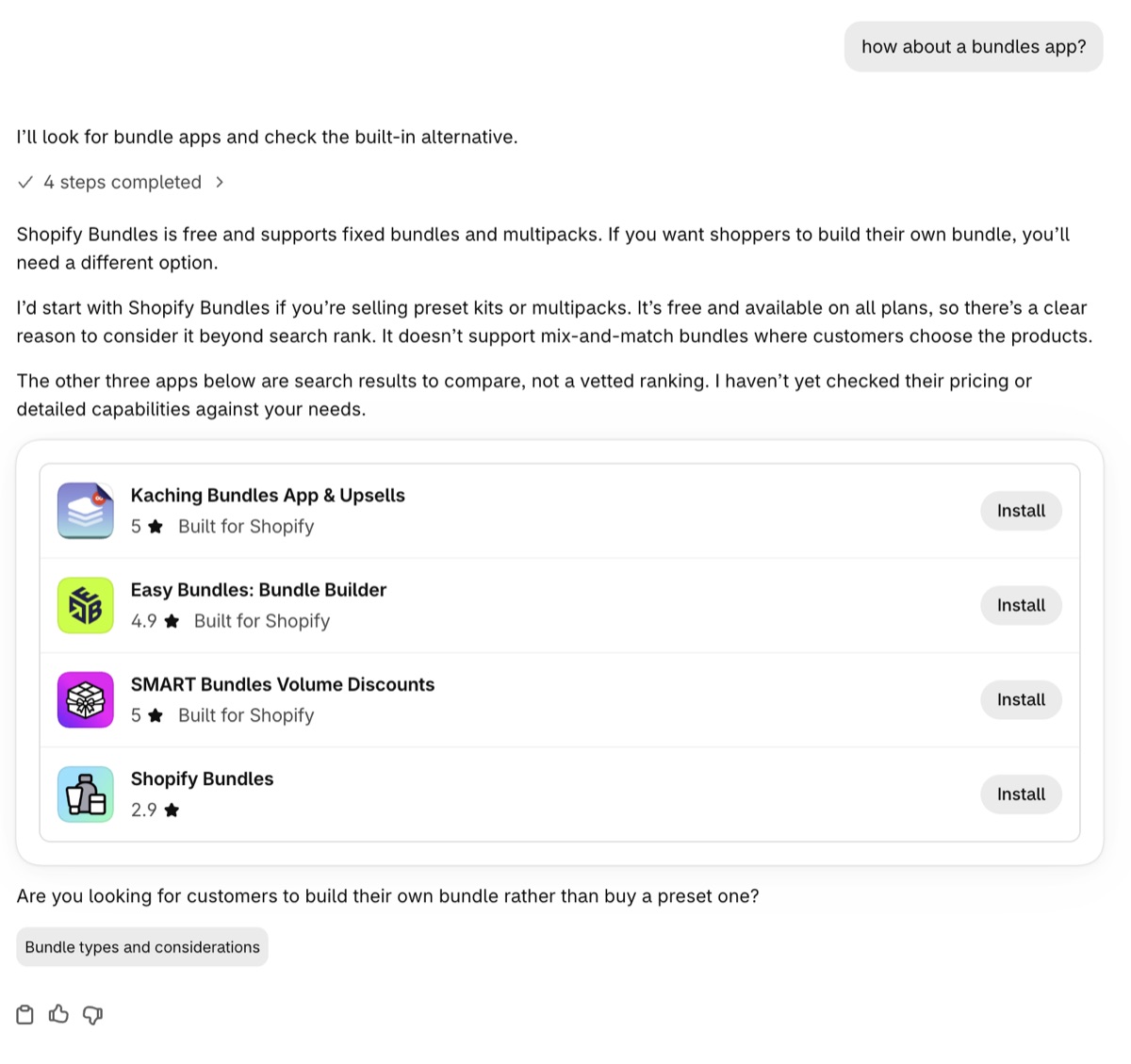
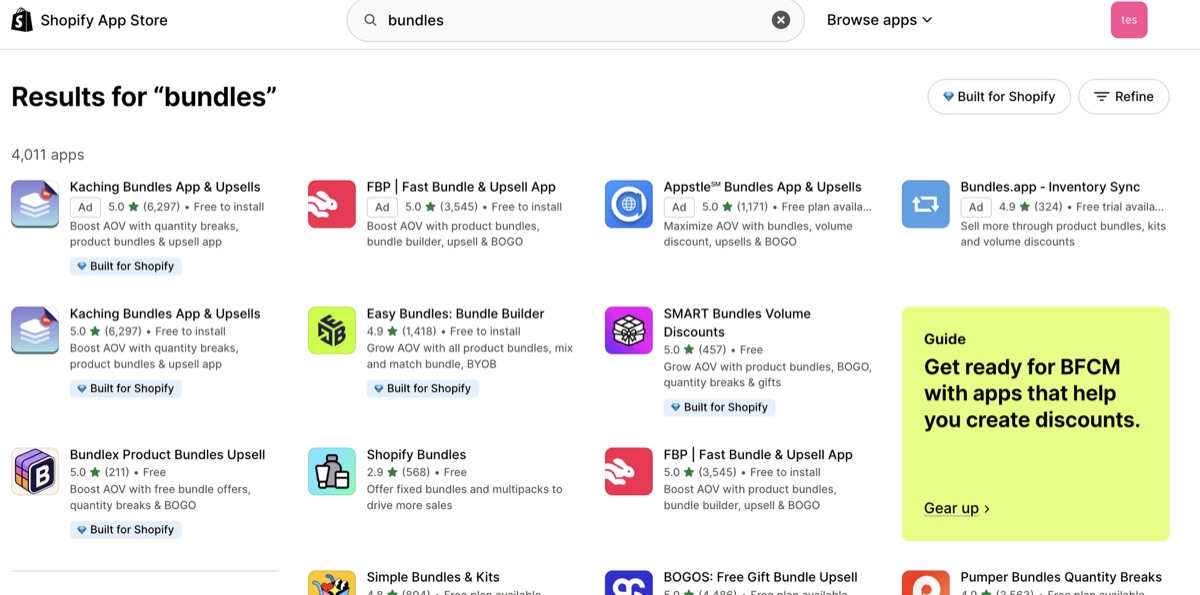
On every search I compared, the website showed four paid slots above those results. Sidekick showed none of them.
In the bundles test, Sidekick recommended Shopify's own Bundles app before the three search results, because it is free on every plan, and it described the three as search results to compare rather than a ranking it had vetted. When I asked how it had chosen, it said it had not compared the third-party apps' features, pricing or reviews. It also named what the built-in app can't do, mix-and-match bundles, and asked the merchant whether they needed that.
In the product reviews test, the second card was an app with 368 reviews. Two apps with 772 and 1,164 reviews were not in the three. Sidekick showed the website's order and left it at that.
What Happens With Harder Requests
On October 15 I went back with requests that ask for two features at once, or describe a problem without naming a kind of app.
Two features in one request
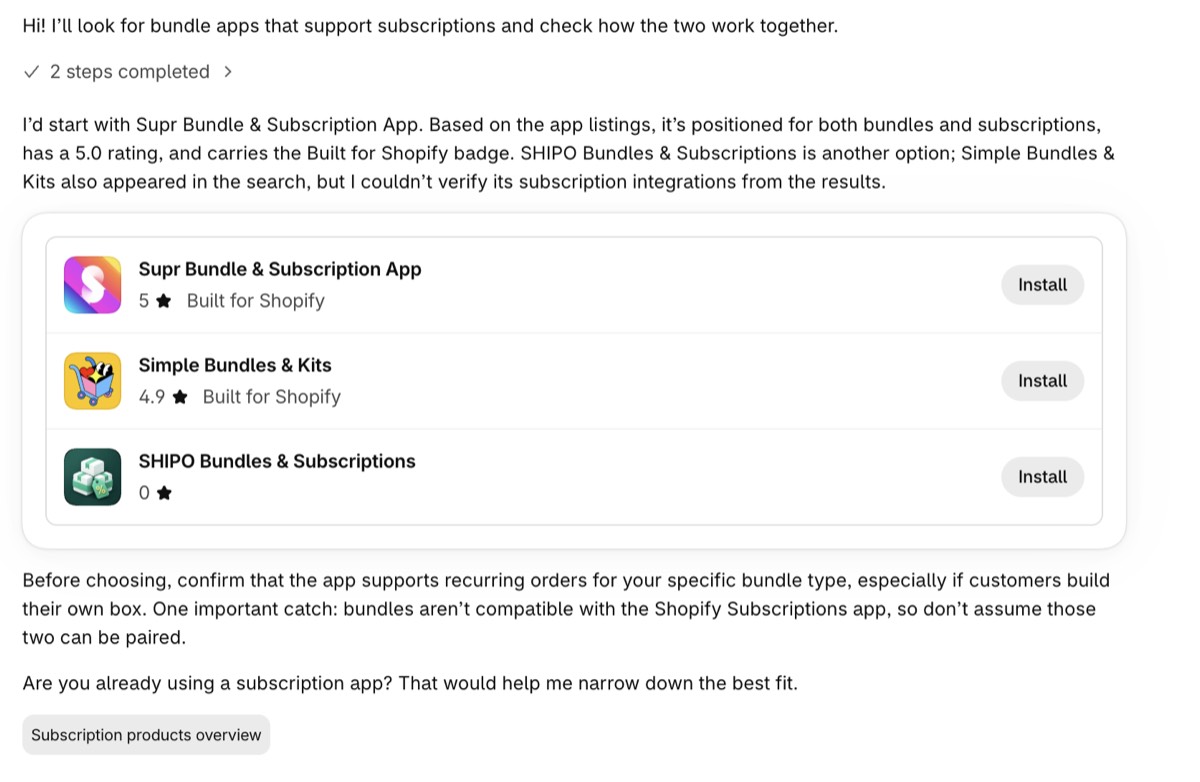
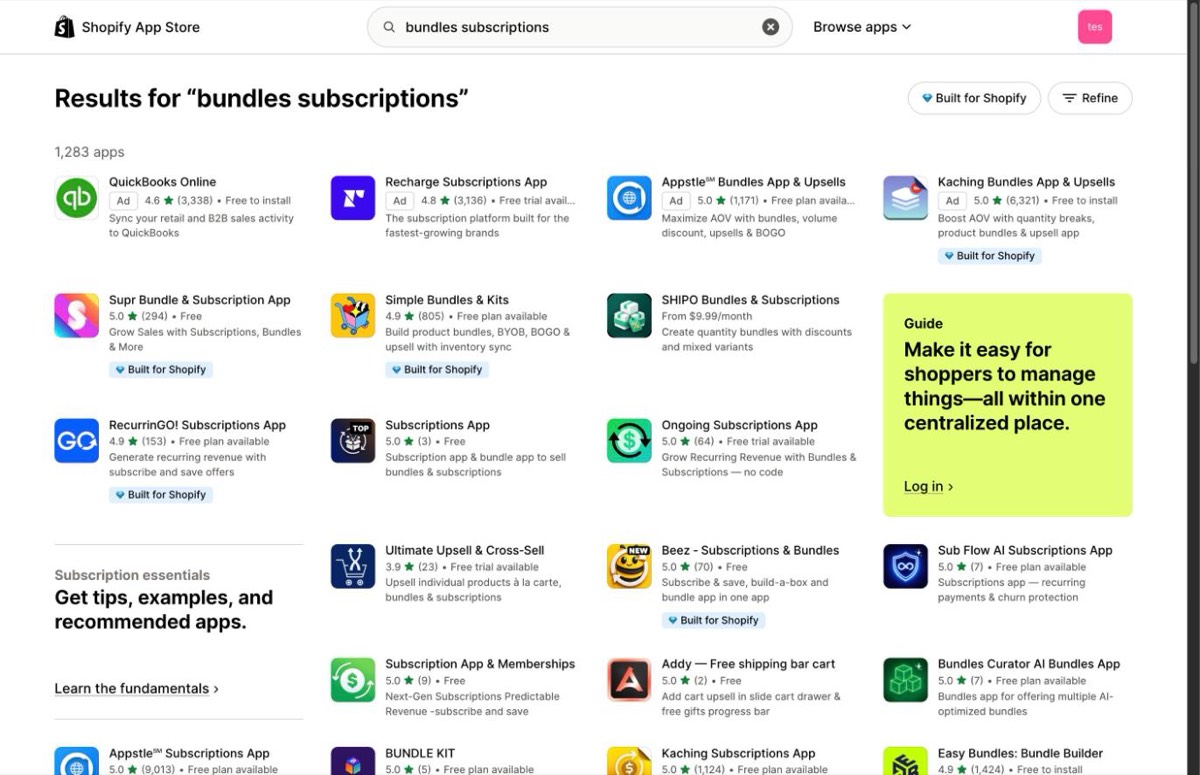
For "a bundles app that also supports subscriptions", Sidekick searched "bundles subscriptions". Its three cards were the website's first three organic results for those two words, in the same order, and a new chat returned the same three. The merchant's full sentence, typed into the website, gives a different list. The rank that counts is for the short keyword pair.
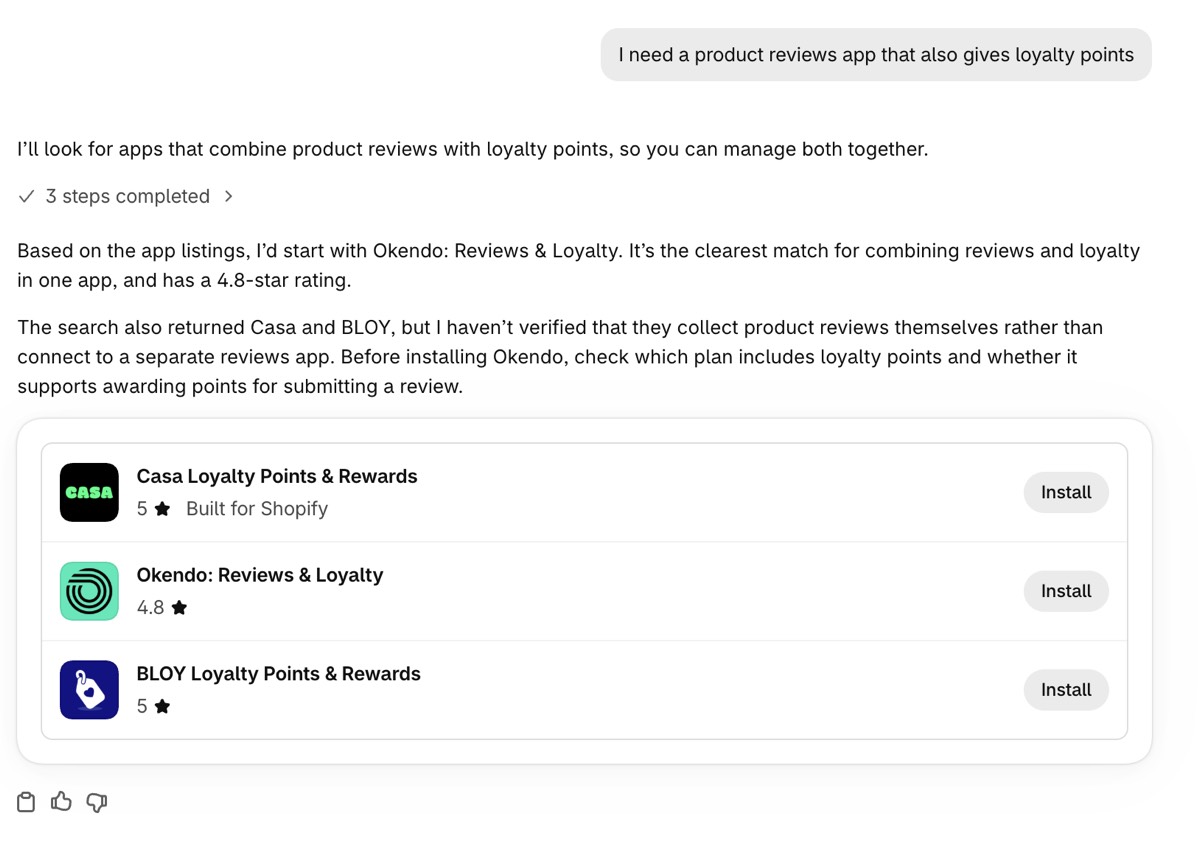
For "a product reviews app that also gives loyalty points", it searched "reviews loyalty points". The first two cards matched the website's first two. The third card was the website's sixth result.
A problem with no category
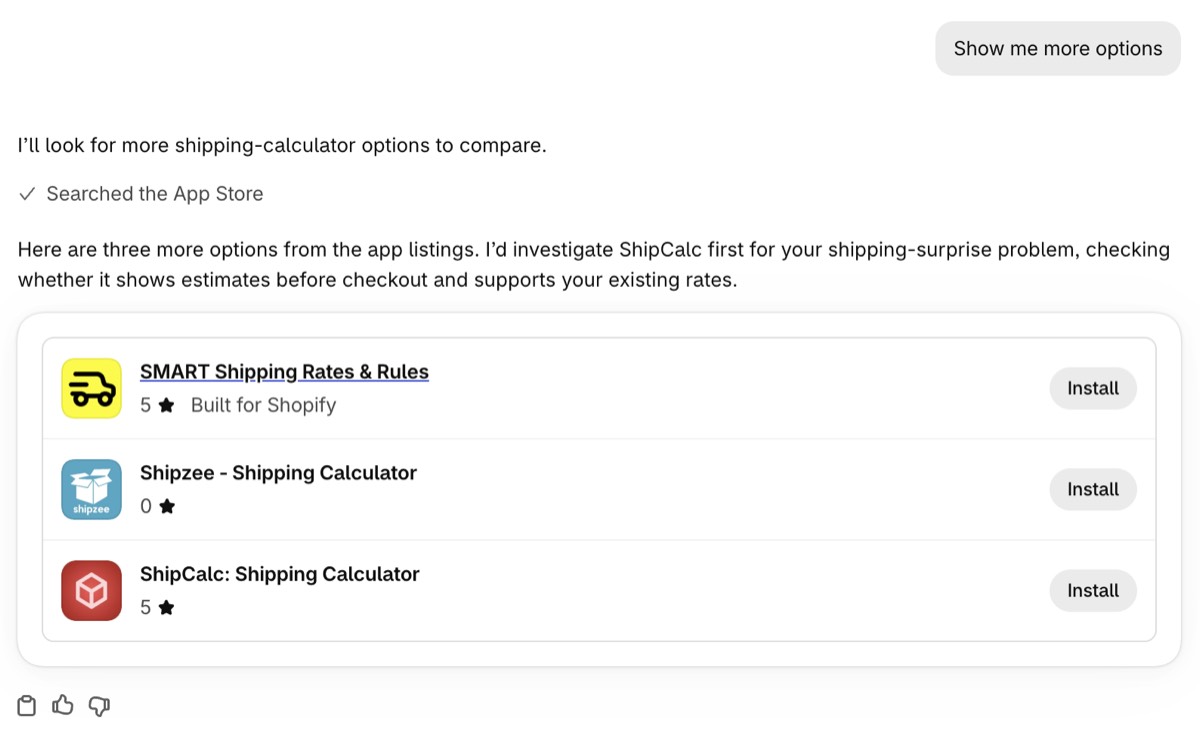
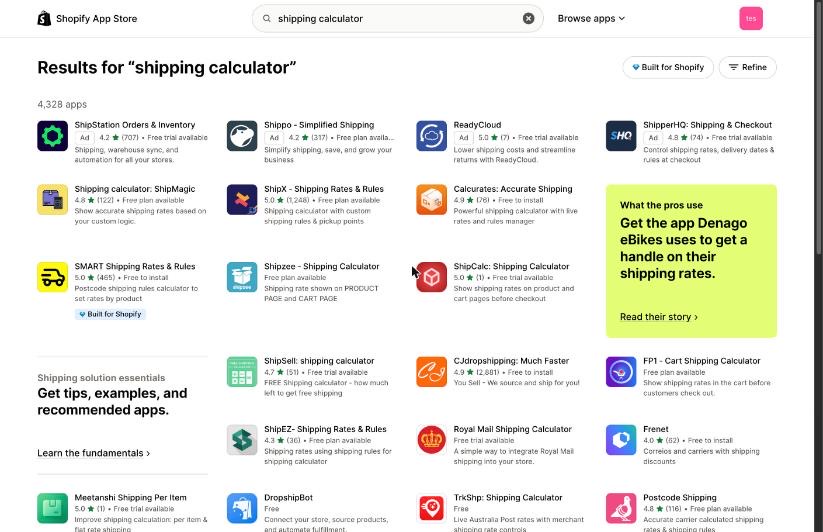
I described a shipping problem without naming an app type. Sidekick summed it up as making "shipping costs clear before customers reach checkout", searched "shipping calculator", and showed the website's first three results. When I asked for more, it showed the next three, results four to six, in the website's order.
Then it said to look first at the last of them, the sixth result. That app had one review. Its subtitle reads "Show shipping rates on product and cart pages before checkout", close to how Sidekick had restated the problem. The first card in that set had 465 reviews and the Built for Shopify badge. One test, one store, one day. Check it on your own keywords before you rely on it.
What You Can Do About It
If Sidekick's recommendations are App Store search results, then getting recommended is App Store search work with a shorter query.
01
Find out where you rank for the short keyword
Take the one-to-three-word phrase a merchant would use for your feature and search it on the App Store website. Skip the ads and count the organic results. In six of my seven tests, Sidekick's first answer was those first three, so that is where you need to be. If you are not, the merchant has to ask for more, and in the shipping test the second answer was results four to six. What counts is the keywords Sidekick extracts from the merchant's sentence.
02
Put the merchant's problem in your name and subtitle
The card shows your name. When Sidekick points at one app to try first, it says it is going by the listings. In the shipping test the app it pointed at had a subtitle close to Sidekick's own restatement of the merchant's problem. Write yours in the words a merchant uses for the problem, and let the category label come second. This is the work I do in App Store optimization for Shopify apps.
03
Say what you do that the built-in feature doesn't
If Shopify has a native version of your feature, Sidekick names it in the same answer and can tell the merchant no app is needed. Your listing's job is the gap. In the bundles test Sidekick named the gap itself, mix-and-match, and one of the three apps had those words in its subtitle. If a merchant can't tell from your name and subtitle what you do beyond the free option, they have no reason to look past it.
04
Stop expecting ads to carry over
The four paid slots at the top of App Store search did not appear in any Sidekick answer I tested. Ads still have a job for your listing: the search terms they collect show you the words merchants use, which is what discovery ads are for.
05
Reviews work through the search rank
Shopify's help center says positive reviews make an app appear higher in App Store search results and category pages, and its Built for Shopify requirements gauge usefulness by installs, number of reviews and average rating. So reviews feed the rank Sidekick follows. In my tests they did not override it: an app with more reviews did not move above a higher-ranked one, and Sidekick said it had not compared reviews itself. The star rating is on the card, and the merchant sees it.
06
Get the Built for Shopify badge if your app qualifies
Shopify's changelog says the badge improves search ranking in both the App Store and Sidekick, and the Winter 2026 Editions page says badged apps get higher prioritization and clear badges in Sidekick. The badge did not decide every result in my tests: in the shipping test Sidekick pointed at a one-review app without the badge over a badged app with 465 reviews. If your app can meet the criteria, get it.
The Second Door: Sidekick App Extensions
Getting recommended is one job. Shopify has published how the other job works, which is letting Sidekick read from your app or act inside it. Since June 2026 any app developer can build a Sidekick app extension. There are two types. App data makes your app's content searchable in Sidekick, so a merchant can ask about it and see the relevant items. App actions let a merchant start something in your app from Sidekick, which opens the right page with the context filled in, and the merchant confirms before anything changes. Eighteen launch partners were already live with it. Shopify's developer docs add that Sidekick and the admin can suggest your app when its registered intents can help a merchant get things done, which makes an extension a second way in, separate from search.
Three changelog entries since then matter if you build one. Intents are how an extension lets Sidekick open a page or flow in your app, and all three involve them. In August, intents on the link target started opening as a full page instead of an overlay, with no developer action required. In late September, extensions that declare only intents became eligible, and an app with one needs an extensions_summary, a one-sentence description of what the app can do in Sidekick, in its shopify.app.toml or its next deploy fails validation. And days later, apps that create discount types with Shopify Functions can register a discount intent so Sidekick can open their create and edit flows. None of the three say anything about how Sidekick orders the apps it recommends.
What I Did Not Test
How App Store search itself decides the order. Whether a keyword in the app name moves an app up that order. And what a store with products and history gets, since mine is a development store with neither. Seven requests on one store over two days show what Sidekick does with a search. How to rank in that search is a different question, and these tests don't answer it.
Common Questions
Does Sidekick read my app's reviews?
Indirectly, through the search rank. Shopify says positive reviews make an app appear higher in App Store search results, and Sidekick followed that search order in my tests. A bigger review count on its own did not move an app above a higher-ranked one: in one test an app with 368 reviews made the three while apps with 772 and 1,164 did not, and Sidekick said it had not compared reviews itself. The star rating is on the card, so the merchant still sees it.
Do I need a Sidekick app extension to be recommended?
Not for the search path. Every third-party app Sidekick showed in my tests was an App Store search result, with no extension involved. Shopify's developer docs describe a second path: Sidekick and the admin can suggest your app when its registered intents can help a merchant get things done. The extension's main job is letting Sidekick read your app's data or act inside it.
Does paying for App Store ads get my app into Sidekick?
In my tests, no. On every search I compared, the App Store website showed four paid slots above the results and Sidekick showed none of them. Only the organic results carried over, and Shopify has published nothing about paid placement in Sidekick.