
What Gets Your Shopify App Recommended by Sidekick
Founders are rewriting their listings for Sidekick. I asked Sidekick how it picks apps, and its answer points somewhere else.
TL;DR
Founders are being told to sharpen their listing copy so Sidekick recommends their app.
I got Sidekick to share the instructions it follows for recommending apps, then tested them on real requests.
It runs an App Store search for one to three keywords from the merchant’s request and shows the results in order. In my tests, the cards matched the top organic results almost exactly, and ads didn’t carry over.
So the question is where your app ranks organically for that short keyword.
The keyword Sidekick picks isn’t always the one you’d expect.
And one line in Sidekick’s answers that looks like proof it reads your listing turns out to be something else.
Who This Is For
Shopify app founders who want to use Sidekick to get more installs and more visitors to their app listing.
The Core Problem
The advice going around says Sidekick picks apps by reading listing copy, so founders are urged to rewrite listings for it. I checked that two ways: Sidekick’s own instructions for recommending apps, and real requests set against the App Store.
I asked Sidekick how it decides which apps to recommend, then got it to share its full instructions, its skill. I won’t publish them, but I can describe what they say. They tell Sidekick to run an App Store search with one to three short keywords from the request, show only what the search returns, in the order returned. The cards are built from returned values only, with no added descriptions or reasons for the pick.
That is the primary proof. The tests are the confirmation: I ran the searches in the App Store myself and set the results next to Sidekick’s cards, and they matched. All of it was on one dev store with no products, on October 14 and 15, 2026.
How Does Sidekick Decide Which Apps to Recommend?
The instructions describe a search. My tests matched:
- Compression. The request is cut to one to three keywords. Filler like “app” or “free” is dropped, and a named app is searched by its exact name.
- Search. The keywords go into App Store search and the results become cards, in order.
- Built-in check. A feature or category search is repeated for features Shopify already includes, shown last. Exact-name searches and later pages skip it.
- Follow-up. For a vague request, the instructions say to suggest categories and ask what the merchant needs before searching. In my bundles tests it searched first, then asked.
- More options. Later pages run only when the merchant asks for more of the same query.
The cards carry a title, icon, star rating, the Built for Shopify badge when it applies, install state, and the listing and install links. Sidekick is told not to add descriptions, and the screenshots show no subtitle or feature bullets.
So Sidekick does not pick or re-rank apps. The cards are the App Store search results in the order returned. The “Based on the app listings” line in its answers is a disclaimer it is told to put before developer-supplied details. It does not show Sidekick reading listings to choose apps.
Two things stay open: how App Store search itself ranks apps, and whether the results Sidekick receives hold more listing text than the card shows.
Does Sidekick Show the Same Apps as App Store Search for a One-Feature Request?
Three requests on October 14, each with a screenshot pair. A plain subscriptions request that day had no screenshot, so it is out of the counts.
Variant images
For “I need an app for variant images,” Sidekick showed Rubik Variant Images & Swatch, OP Color Swatch Variant Images, and GLO Color Swatch Variant Image.
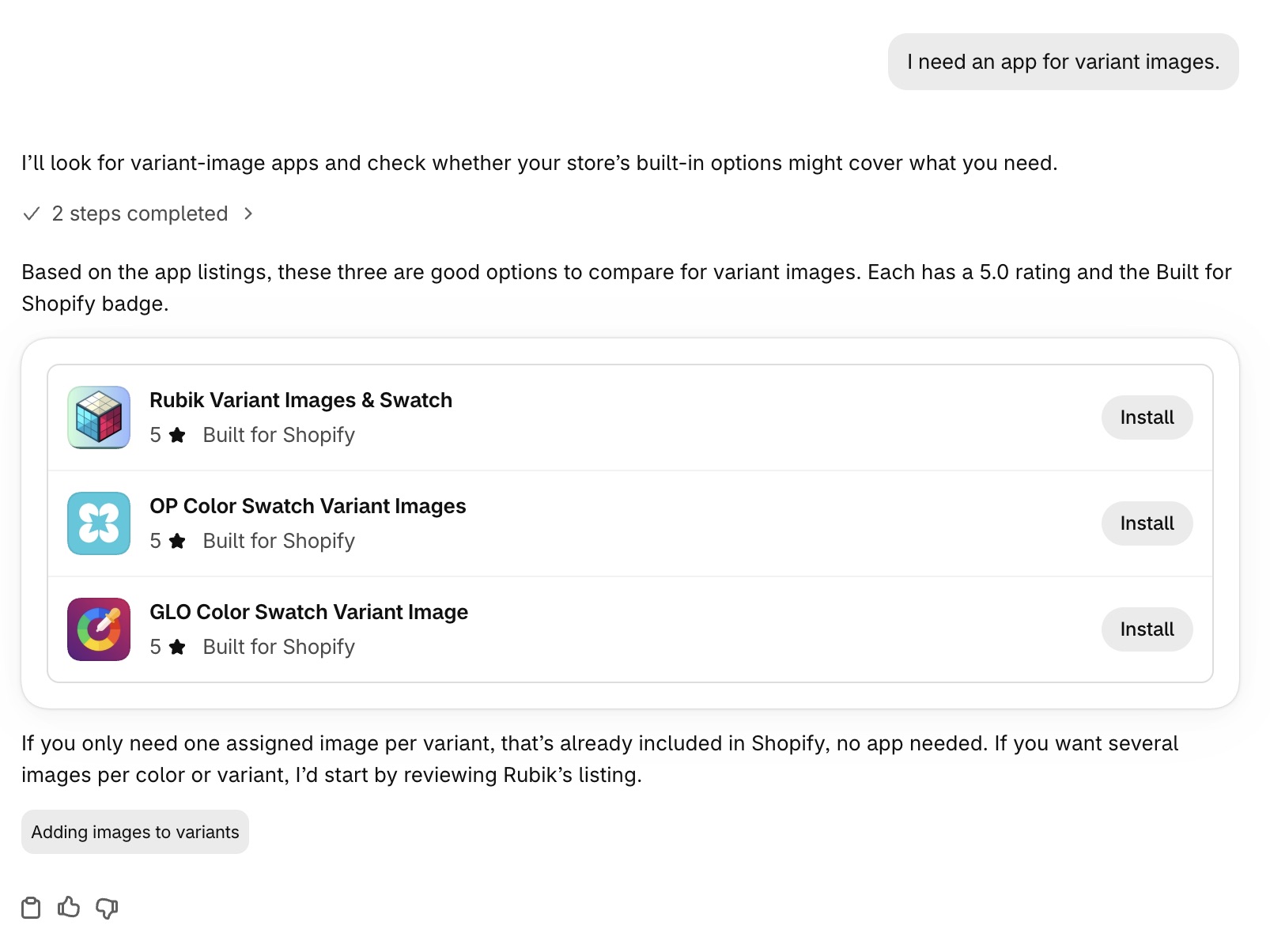
Sidekick’s answer: Rubik, OP, GLO.
App Store search for “variant images” shows 1,957 apps. The first row is four ads: GLO, Re Gallery, Easy Variant Images, SA Variant Image Automator. Organic starts on the second row: Rubik, OP, GLO.
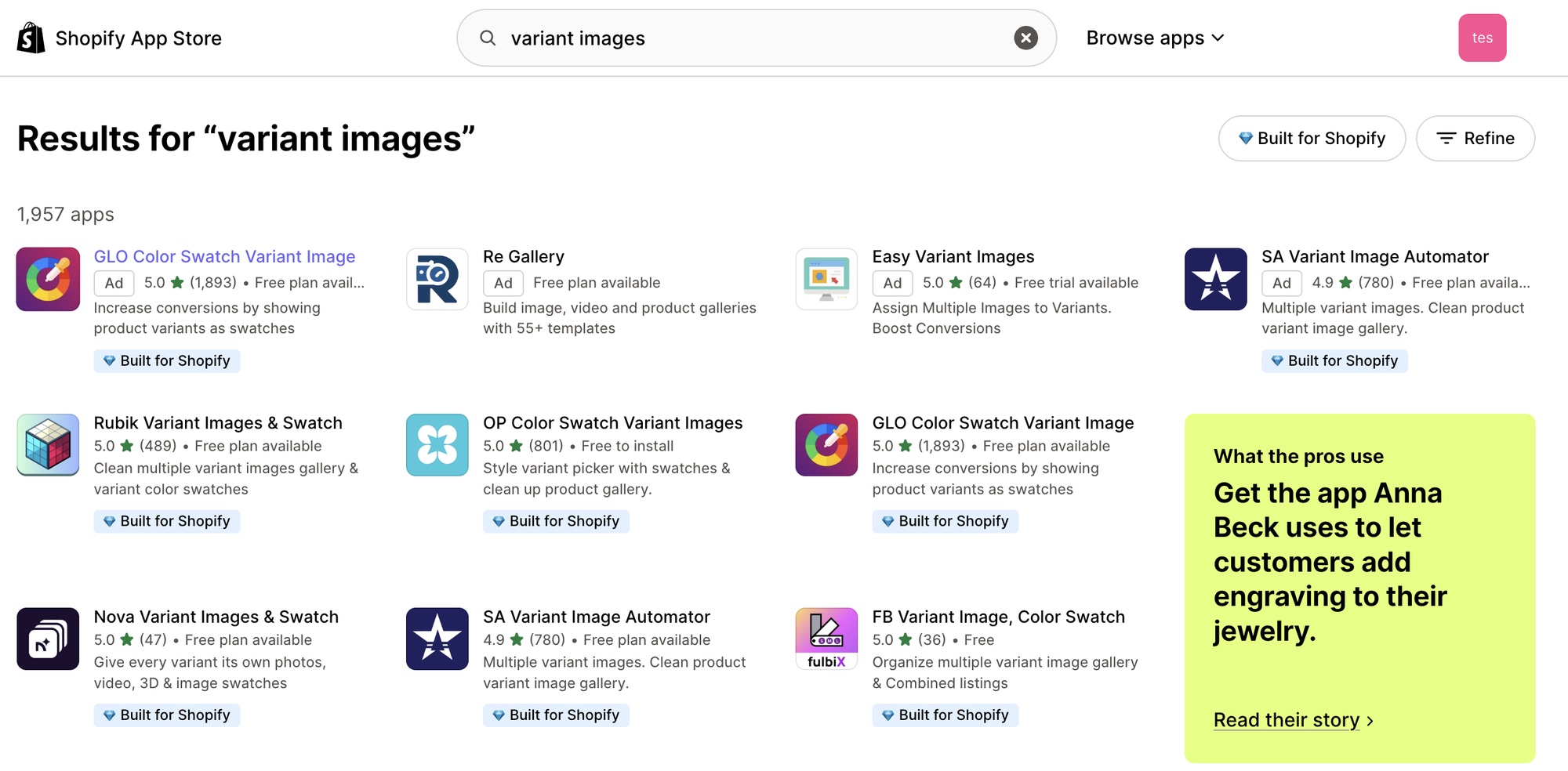
App Store “variant images”: ads on top, organic Rubik, OP, GLO.
Same three apps, same order. GLO appears as an ad and as organic, and its card sits at its organic slot.
Bundles
For “how about a bundles app?” Sidekick showed four cards: Kaching Bundles App & Upsells, Easy Bundles: Bundle Builder, SMART Bundles Volume Discounts, and Shopify Bundles last, at 2.9 stars with no badge.
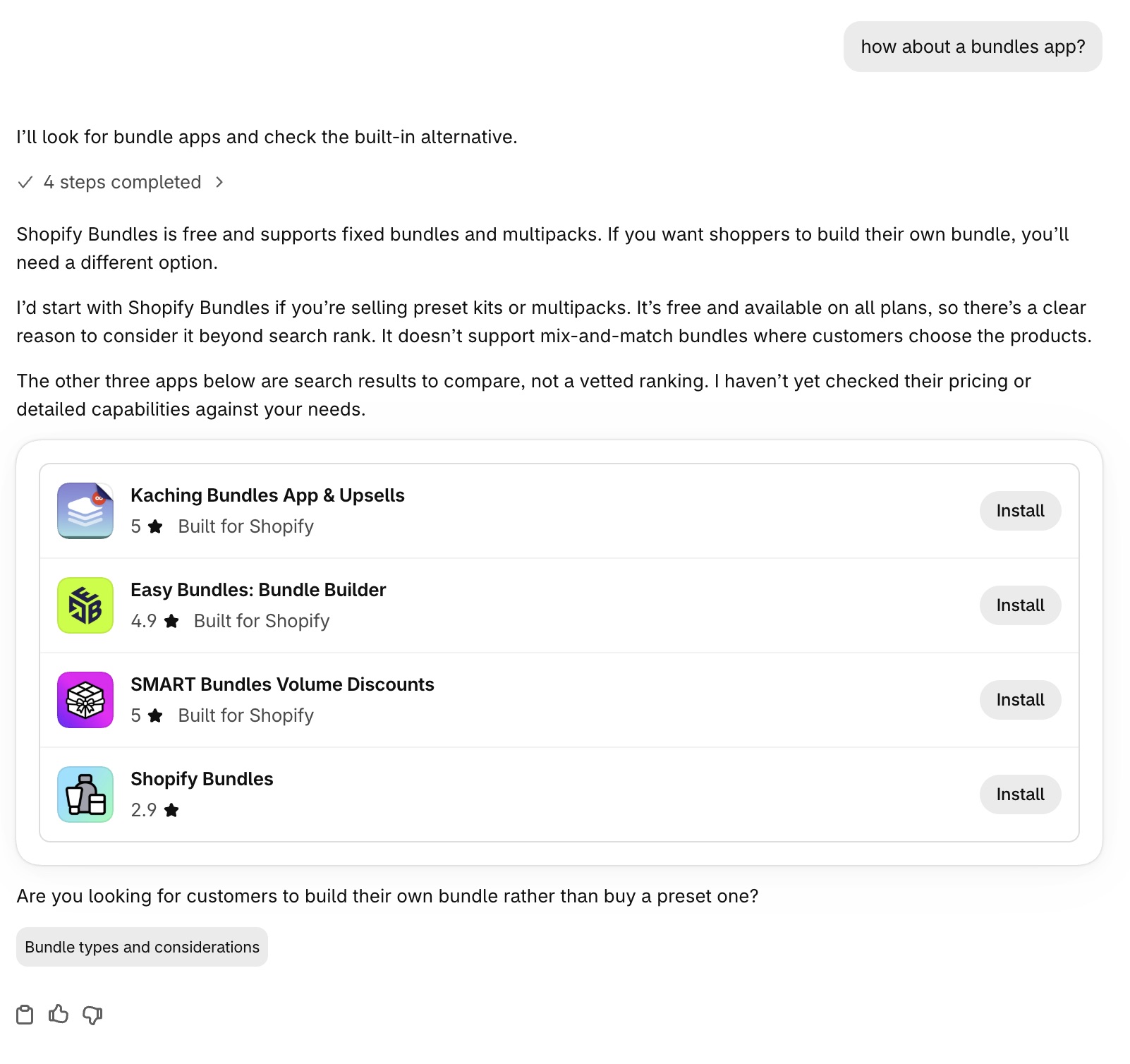
Sidekick’s answer: three third-party apps, then Shopify Bundles.
The App Store search for “bundles” shows 4,011 apps. The top row is four ads: Kaching, FBP, Appstle Bundles, Bundles.app. Organic starts on the second row: Kaching, Easy Bundles, SMART Bundles, then Bundlex, Shopify Bundles, FBP.
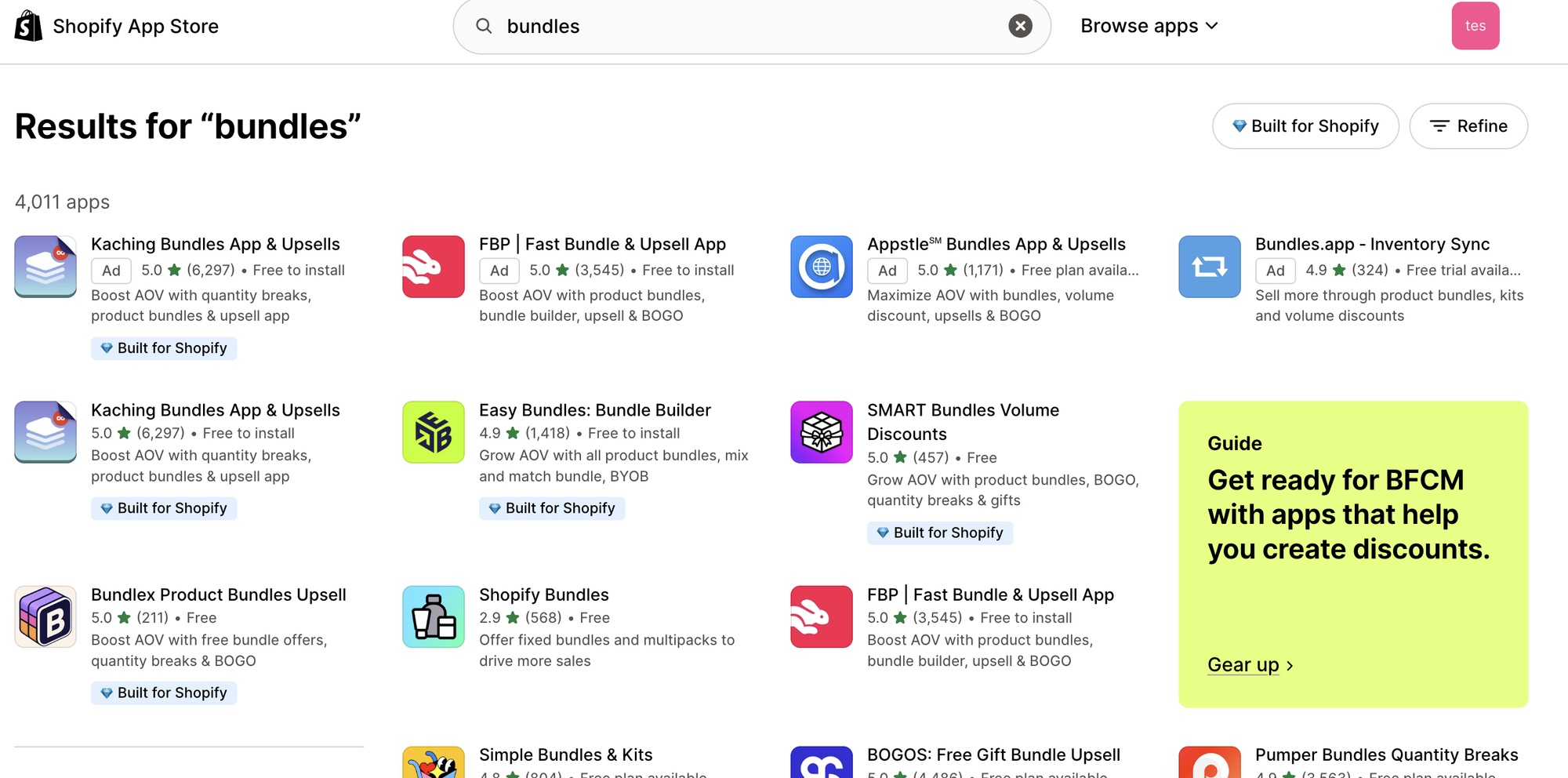
App Store “bundles”: four ads, then organic Kaching, Easy Bundles, SMART.
The first three cards are organic one to three. Shopify Bundles is organic number five, so search position did not put it there. Sidekick told me it searched, checked for a built-in option, then looked up Shopify Bundles by name. Bundlex, organic four, got no card.
Product reviews
The request was “I need a product reviews app.” Sidekick showed Judge.me, TrustShop, Loox.
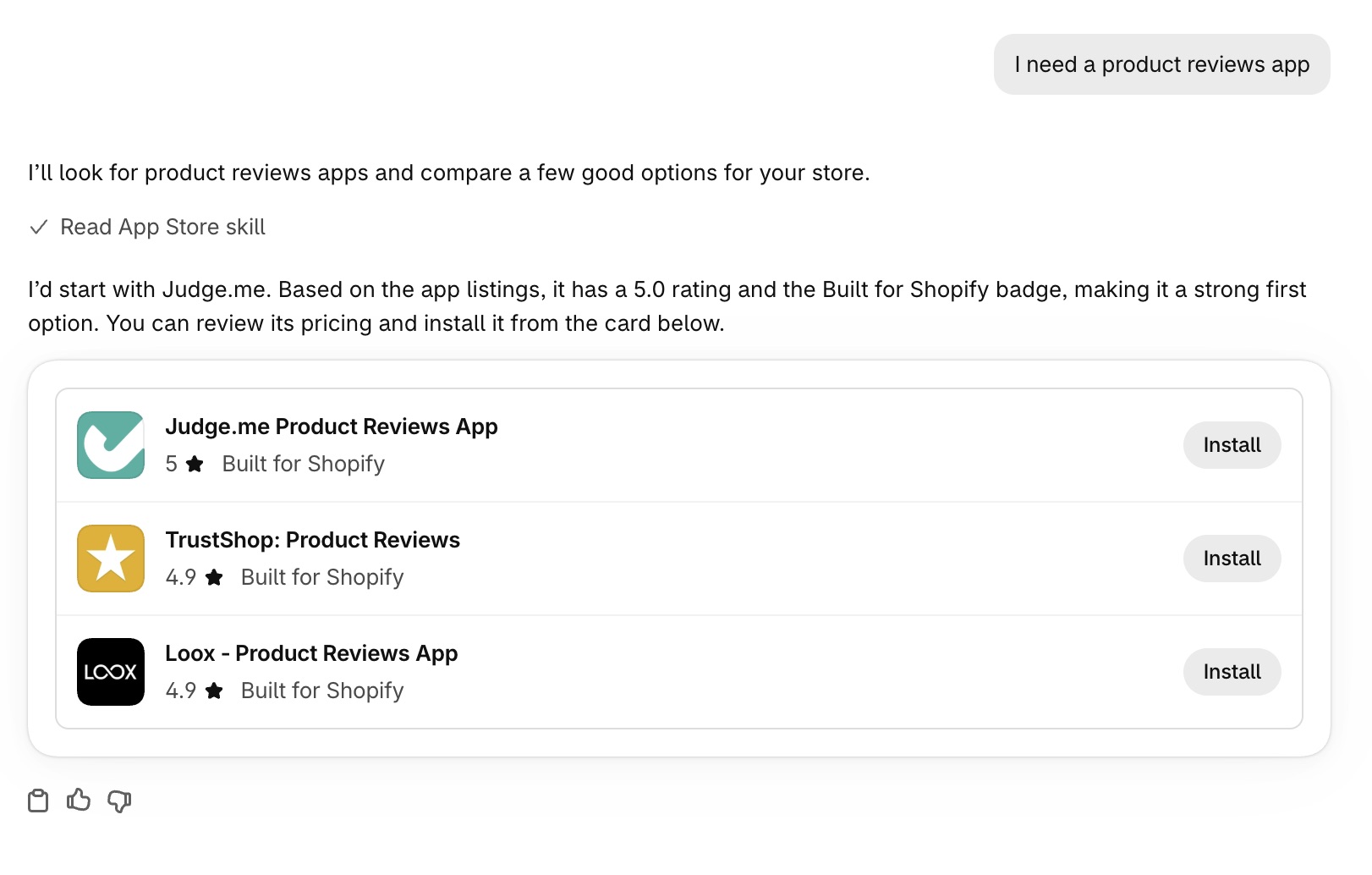
Sidekick’s answer: Judge.me, TrustShop, Loox.
The App Store search for “product reviews” shows 7,728 apps. Four ads sit in the top row: Photoroom, EZ AOV Boost, QuickBooks Online, REVIEWS.io. The first three organic results are Judge.me, TrustShop, Loox.
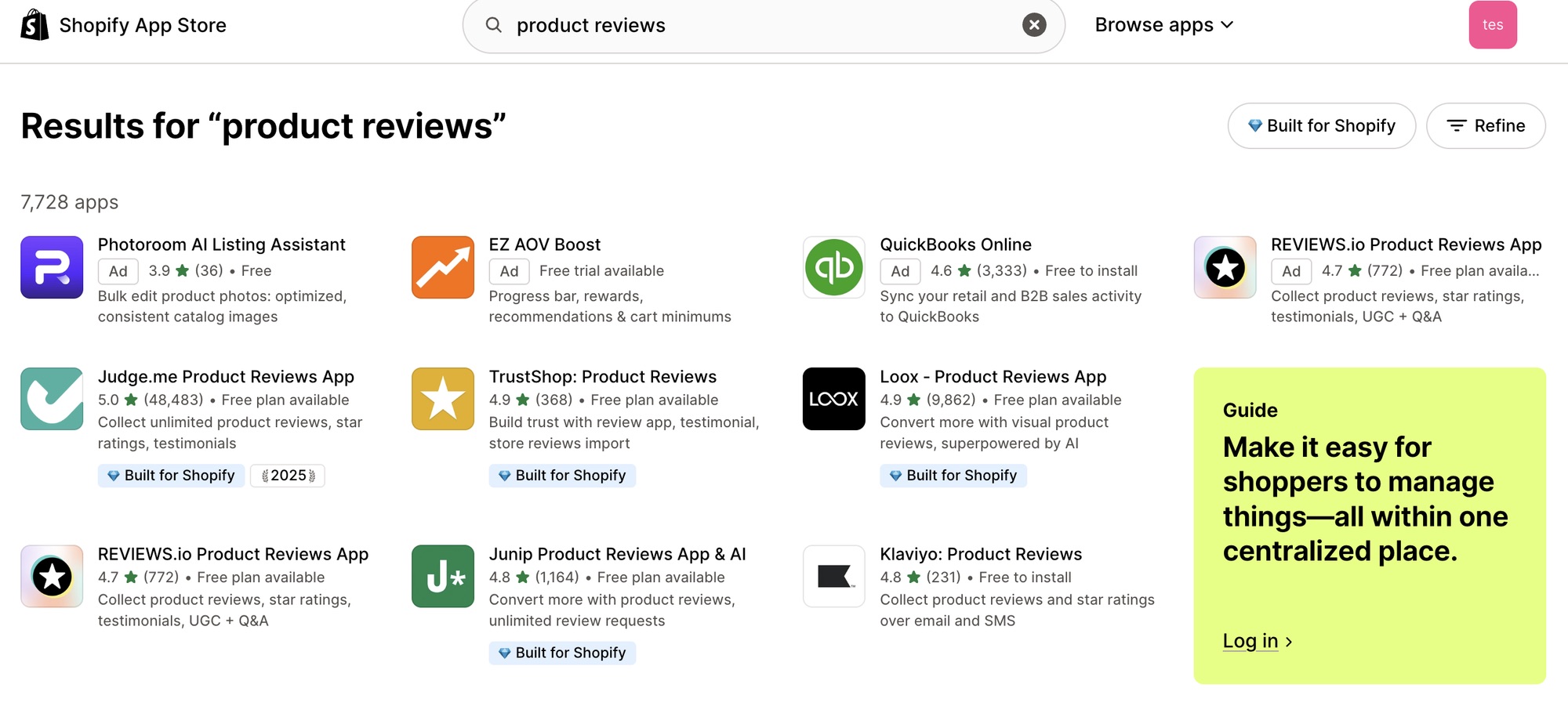
App Store “product reviews”: four ads, then organic Judge.me, TrustShop, Loox.
TrustShop has 368 reviews while REVIEWS.io (772) and Junip (1,164) sit below it, so review count did not order the cards.
Will Running Shopify Ads Help Me Rank Better on Sidekick?
In these tests, no. Every App Store page above has four ad slots in the top row, and apps that held only an ad slot got no card.
Re Gallery and Easy Variant Images (variant images), Appstle Bundles and Bundles.app (bundles), and Photoroom, EZ AOV Boost and QuickBooks Online (product reviews) held ad slots and no organic slot in the part of each page I captured. None got a card.
GLO and Kaching held both, and their organic slots were in the top three, so they got cards. REVIEWS.io (organic four), SA Variant Image Automator (five) and FBP (six) held both and did not. That is a handful of searches, and I did not test how ads change later organic rank.
What Happens When a Merchant Asks Sidekick for Two Features at Once?
Two requests on October 15 went differently.
Bundles plus subscriptions
I asked for a bundles app that also supports subscriptions. Sidekick showed Supr Bundle & Subscription App, Simple Bundles & Kits, and SHIPO Bundles & Subscriptions. Asked, it reported searching “bundles subscriptions” with a limit of three results, and a built-in feature check that found no matches.
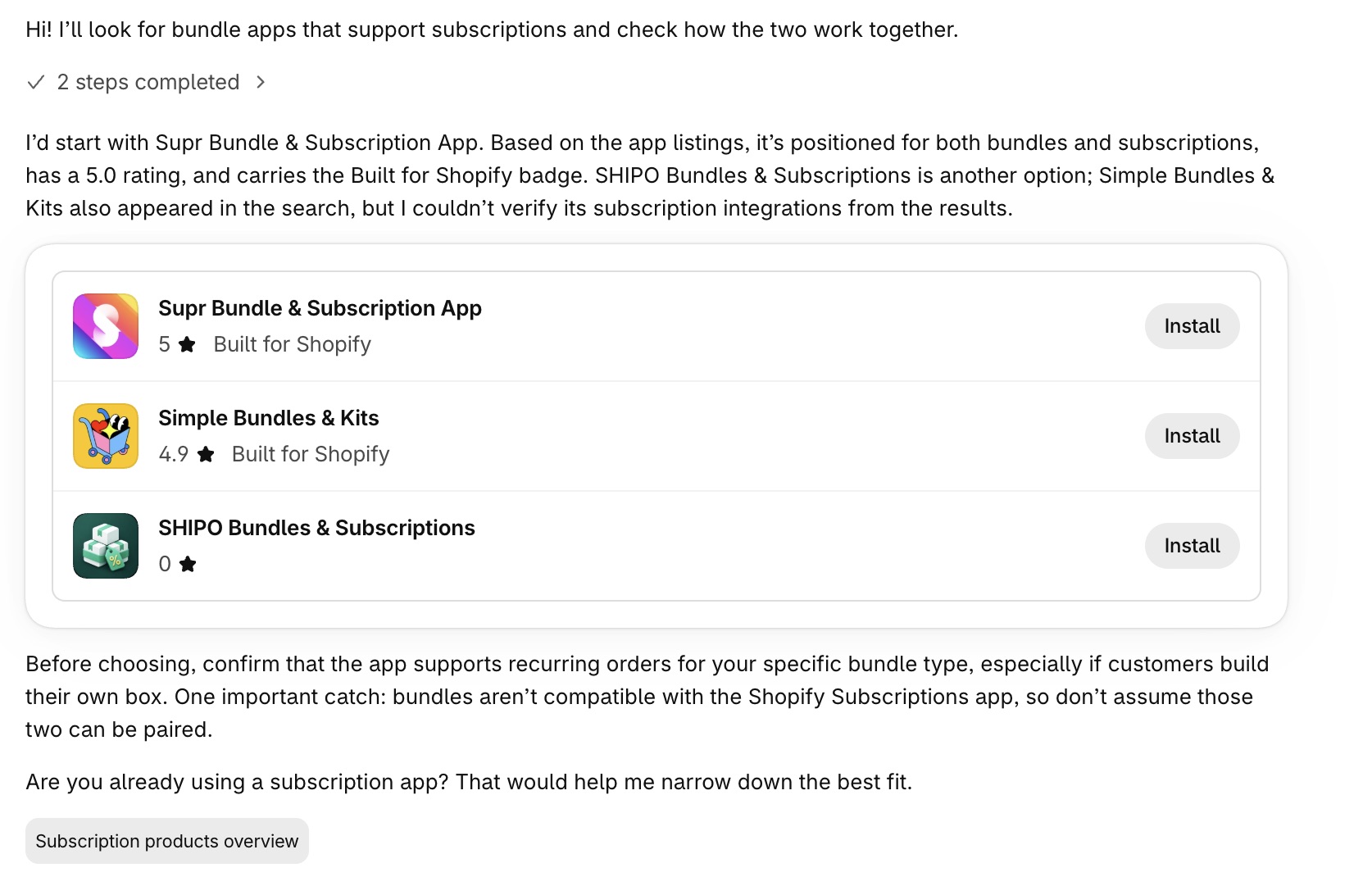
Sidekick’s answer: Supr, Simple Bundles & Kits, SHIPO.
Those two keywords in the App Store give 1,283 apps: four ads, then organic Supr, Simple Bundles & Kits, SHIPO.
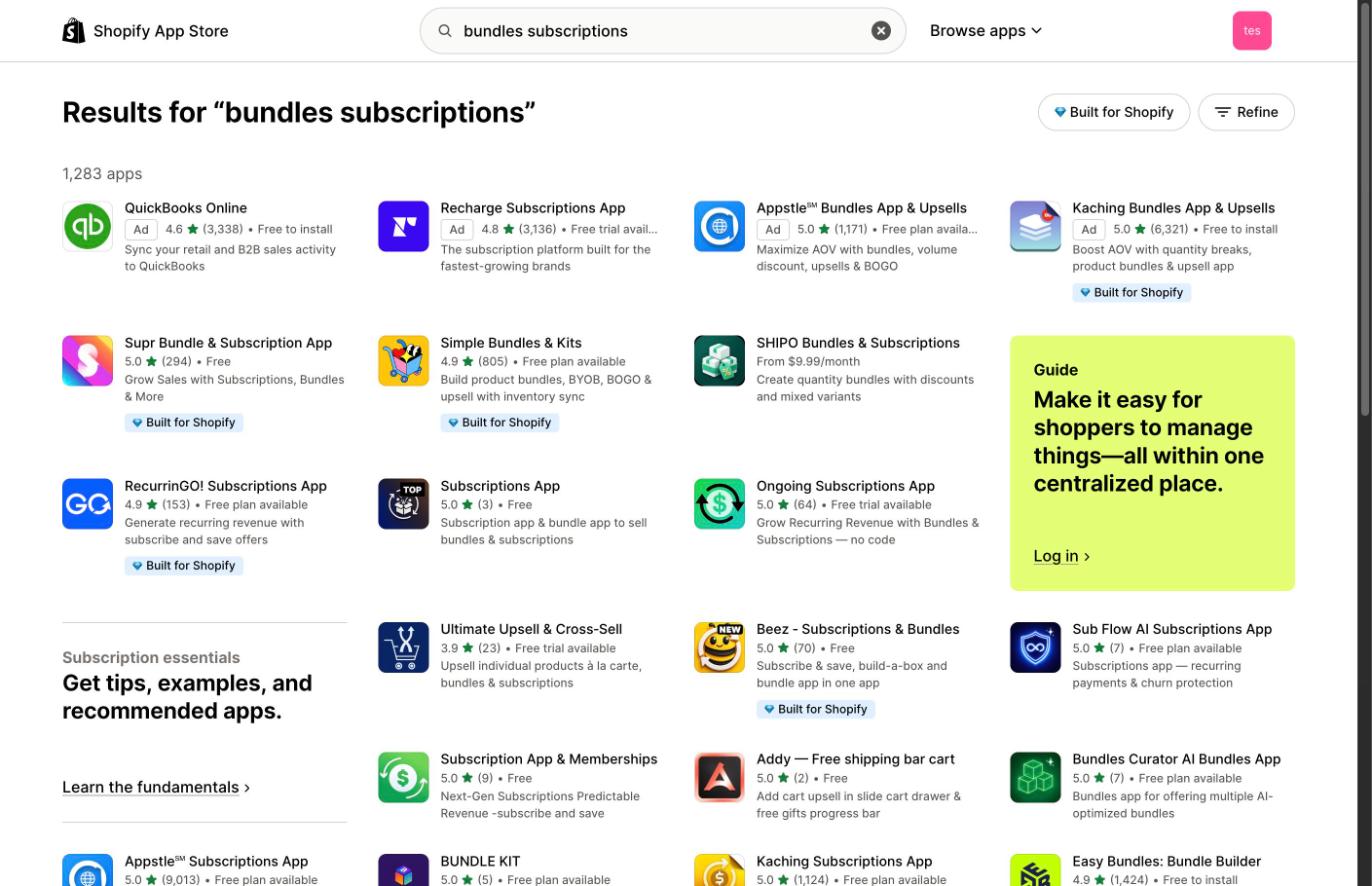
App Store “bundles subscriptions”: four ads, then organic Supr, Simple Bundles & Kits, SHIPO.
The merchant’s own sentence, “bundles app that also supports subscriptions”, gives 6,746 apps. After four ads, Supr is still first, then Appstle Subscriptions, Kaching Subscriptions, Loop and Seal. Simple Bundles & Kits and SHIPO are not on the first screen.
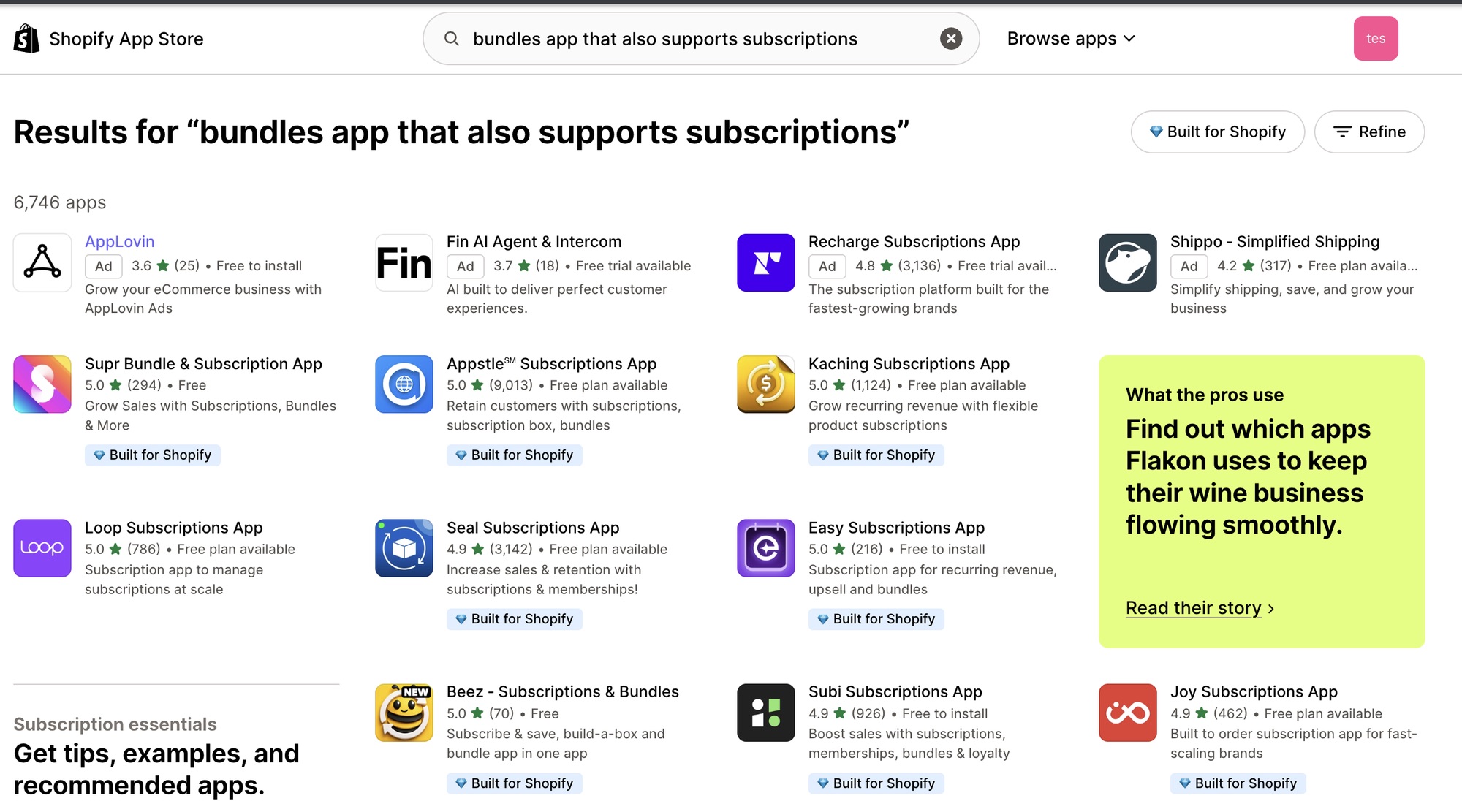
App Store, full sentence: four ads, then Supr and a different organic set.
The full sentence ranks different apps, and the cards followed the rank for the compressed keywords. A new chat gave the same three apps.
Reviews plus loyalty: the miss
I asked for a product reviews app that also gives loyalty points. The cards were Casa Loyalty Points & Rewards, Okendo: Reviews & Loyalty, and BLOY Loyalty Points & Rewards.
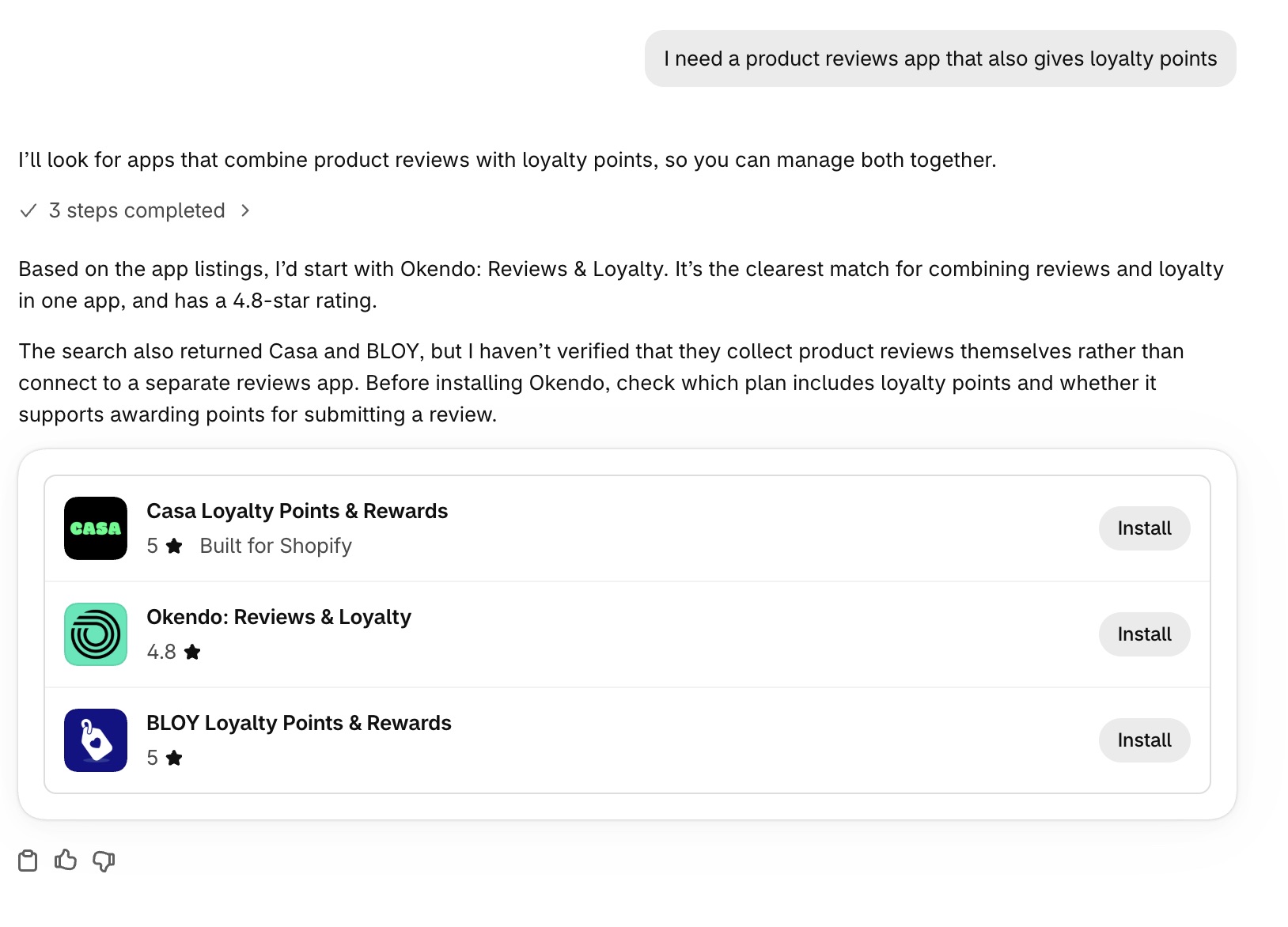
Sidekick’s answer: Casa, Okendo, BLOY. I have no matching App Store screenshot for this one.
Sidekick reported searching “reviews loyalty points”. In the App Store those words gave Casa, Okendo, CWILL, Joy, Reputon Amazon, then BLOY sixth. I took no screenshot, so that order is from my notes.
Two of three cards matched, in order. BLOY took the third card where the App Store had CWILL. I do not know why: the web page and Sidekick’s tool may rank differently, or results moved between checks. I would rather show the miss than round the story up.
Why Does Sidekick Sometimes Recommend an App That Is Not the First Card?
The text around the cards sometimes points at a different app. The clearest case was shipping, where I described a problem: “Customers keep leaving my store at checkout because shipping costs surprise them. What app can help?” Sidekick searched for “shipping calculator”, the name of a type of solution.
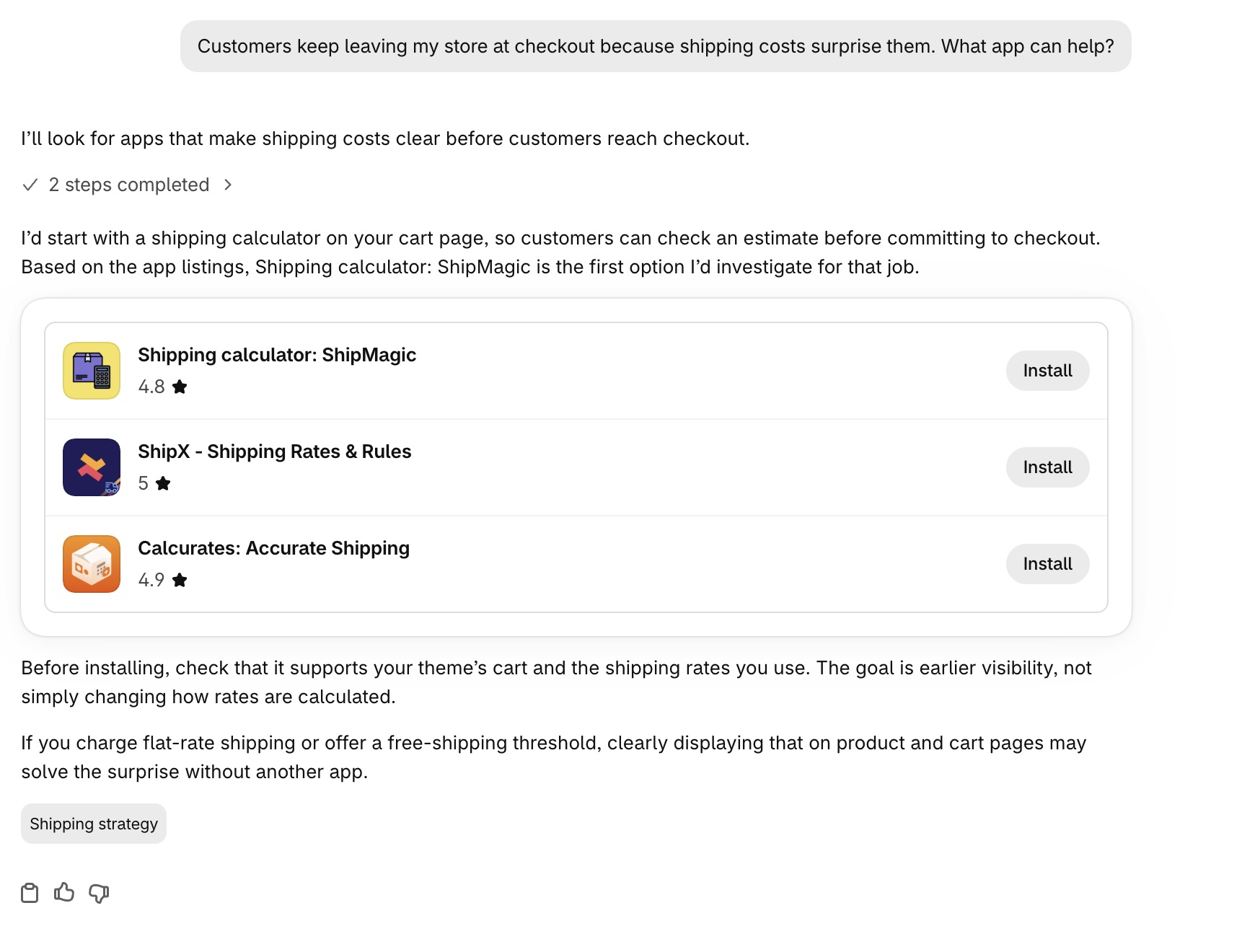
Page one: ShipMagic, ShipX, Calcurates.
Then I asked for more options.
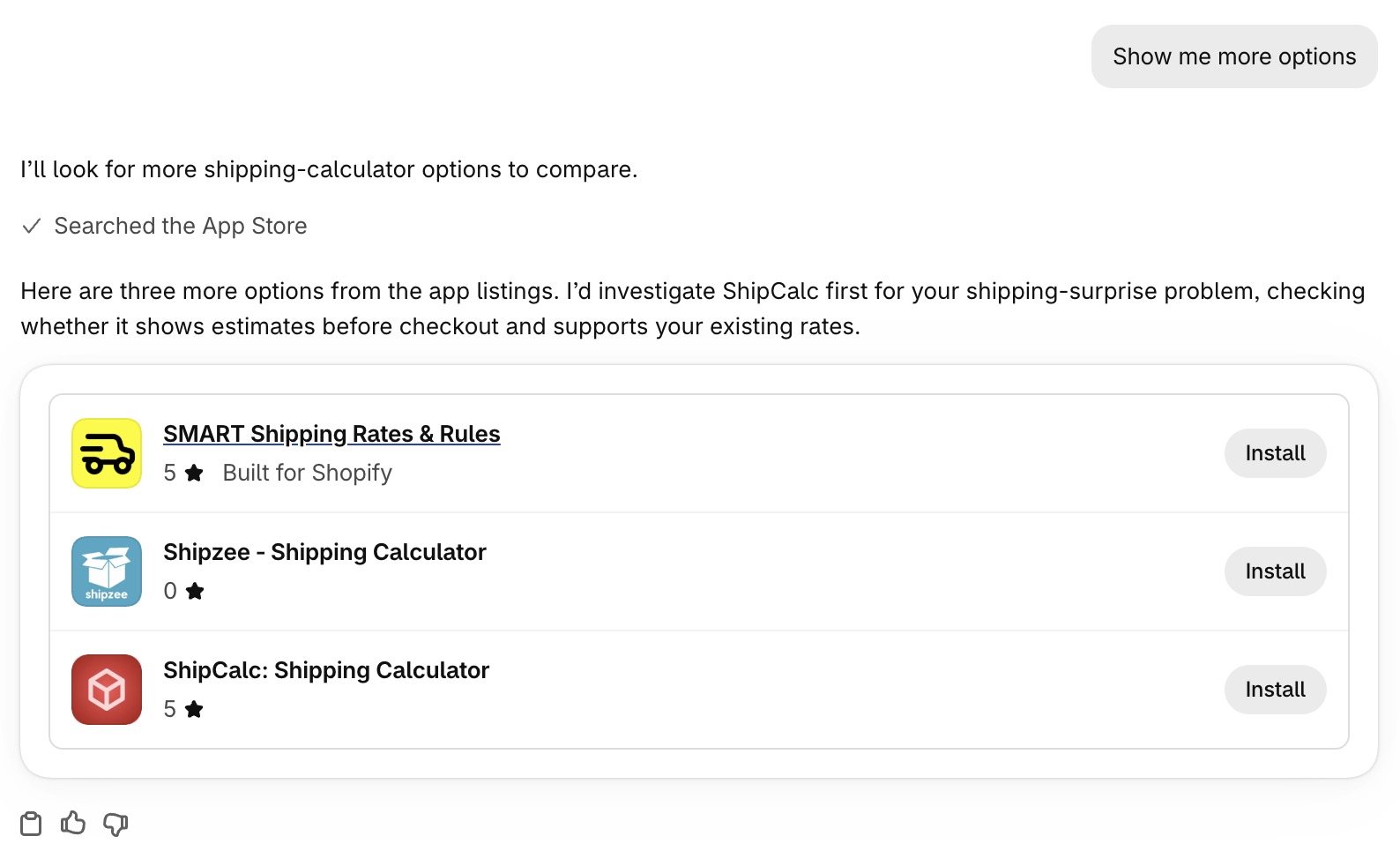
Page two: SMART, Shipzee, ShipCalc.
The App Store search for “shipping calculator” shows 4,328 apps, with four ads in the top row. The organic order underneath is ShipMagic, ShipX, Calcurates, then SMART, Shipzee, ShipCalc.
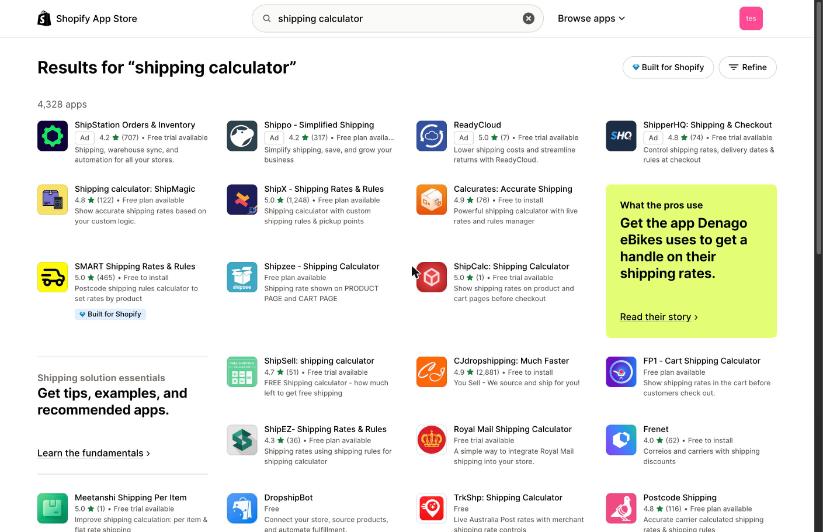
App Store “shipping calculator”: organic one to three are page one, four to six are page two.
Page one is organic one to three. Page two is organic four to six, so “show more” ran the next page of the same search.
The text on page two said to investigate ShipCalc first. ShipCalc is organic number six, with one review, while SMART two slots above has 465 reviews and the Built for Shopify badge. ShipCalc’s subtitle reads “Show shipping rates on product and cart pages before checkout”, close to the problem I described.
The loyalty test did the same: the text recommended Okendo first while Casa was the first card, and Okendo’s name has both words in it, “Reviews & Loyalty”.
In both cases the app the text led with has a name or subtitle close to the request. I do not know why it was chosen, and I would not build a listing strategy on two cases.
What Happens If Shopify Already Has a Built-In Feature That Does What My App Does?
It says so in the same answer. For variant images: “If you only need one assigned image per variant, that’s already included in Shopify, no app needed.” For bundles it said to start with Shopify Bundles for preset kits or multipacks, free on all plans, which does not support mix-and-match bundles, and called the other three “search results to compare, not a vetted ranking”.
It did not lead with a built-in option every time. In the bundles plus subscriptions test, the check found no matches, and Sidekick warned that bundles are not compatible with the Shopify Subscriptions app. If your listing does not say what you do beyond the built-in version, the merchant hears that gap from Sidekick first.
What Should I Do About This for My App?
None of these is a guarantee.
- Search your category’s short feature term in the App Store. One to three words, the way a merchant’s request would shrink. Read organic results only and note where you sit.
- Check whether you only hold an ad slot. In these tests that got no card.
- Look at organic positions four to six too. “Show more” ran the next page for shipping, so they can still show up.
- Check for an overlapping built-in Shopify feature. If one exists, make what you do beyond it plain in the listing.
- Run your own category words in Sidekick. Ask in a merchant’s words on a dev store, then search the compressed version in the App Store and compare.
An organic top-three slot for the short term earned a card on the first answer, with one slot missed. Ranking only for the long phrase a merchant might type may not help, since Sidekick searched the short version.
Listing copy can still matter through App Store search rank, but I could not see how that search ranks, so I cannot say which words do the work. Rank for the short term first, then make the listing say what the merchant should expect once Sidekick has pointed them there.
The discovery campaign method is one way to find the words merchants type. If you sell bundles, this post on bundle app listings covers a separate positioning problem. The wider work is Shopify App Store optimization, and Sidekick has its own page.
What Do These Tests Not Show?
- Real stores. One dev store with no products. A real catalog or region might change the compression.
- How App Store search ranks. I saw the order, not the reason, and I did not test whether a keyword in your app name drives rank or whether the results Sidekick receives hold more listing text than the card shows.
- Anything over time. Two days of tests. Both Sidekick and the App Store can change.
Frequently Asked Questions
Does Sidekick Recommend My App Based on Its App Store Search Rank?
Mostly, in my tests, and its instructions say to show the search results in the order returned. Six sets of cards with App Store screenshots matched the top organic results in order (in bundles, the first three of four). A seventh matched two of three.
Will My Shopify App Store Ads Get My App Shown in Sidekick?
Not in these tests. Apps that held only an ad slot got no card, and apps with both showed up through the organic slot.
How Do I Get My App Recommended by Sidekick?
Start with organic rank for the short feature term a merchant’s request compresses to. These tests do not say how to improve it, but the five checks show where you sit.
Does Sidekick Read My App Listing to Decide Whether to Recommend It?
Not to decide which apps appear. The cards show only the title, icon, rating, badge, install state and links, and the “Based on the app listings” line is a disclaimer placed before developer-supplied details. Which apps appear is the App Store search’s order, and how that search ranks is the part I could not see.
Key Takeaways
- Sidekick’s cards followed organic App Store rank. In my dev-store tests, the cards were the top organic results for the keywords Sidekick searched, in order, with one slot missed.
- Ads did not carry over. An app with only an ad slot got no card.
- Sidekick searches a compressed version of the request. One to three keywords.
- The text around the cards can lead with a different app. It happened in two tests.
If you want a second read on where you sit for the words merchants use, book a discovery call.